Digital Asset Management for Modern Video Workflows
Think of your media library less like a chaotic digital cupboard and more like a smart engine that powers your entire creative process. That's the real promise of modern digitales asset management (DAM). A DAM platform is so much more than just cloud storage; it turns scattered files into a living, searchable, and secure hub for your most valuable content.
Beyond Storage: How Digitales Asset Management Powers Creative Teams

At its heart, a proper DAM system solves one massive problem: media chaos. For professional media teams, post-production houses, and creative agencies, this chaos shows up everywhere. It's the endless searching for the right clip, the version control nightmares, and the workflow friction that just drains creative energy. It's that sinking feeling when you waste an hour hunting for an approved asset from last year's campaign, or the confusion of trying to manage feedback from five different people over email.
A DAM brings order to that chaos by creating a single source of truth for every brand and media asset you own. It’s less like a hard drive and more like an intelligent library. Every file—from raw video footage and audio clips to logos and project briefs—is meticulously organised, tagged with useful data, and made instantly available to the right people, right when they need it.
The Shift From Storage to an Active Workflow Hub
The real magic of a modern DAM is how it becomes an active part of your workflow, not just a passive place to park files. It’s where assets are uploaded, reviewed, approved, and sent out into the world, all from one secure environment. This centralisation delivers some immediate wins for any organisation that deals with a lot of digital content.
- Massive Efficiency Gains: Your team can find exactly what they need in seconds, not hours.
- Stronger Brand Consistency: Everyone is working from the same playbook, using the most current, approved versions of assets. No more brand dilution.
- Tighter Security: Detailed permissions control exactly who can view, edit, or download your valuable intellectual property.
For teams that live and breathe video, the demands are even greater. This is where older, traditional DAMs often stumble, struggling with the sheer size and complexity of video files. Today’s solutions, like WIKIO AI, are built from the ground up as a video collaboration platform, designed specifically to handle these challenges.
WIKIO AI is a modern alternative to legacy DAMs, giving post-production houses and creative agencies AI-powered tools that completely change how they manage and work on video. WIKIO AI provides AI subtitle translation in over 40 languages, semantic search, and free external collaboration.
Unlike old-school systems, a true video asset management platform integrates the entire feedback loop. It's a powerful video review tool where clients and collaborators can leave time-stamped comments directly on the timeline. If you want to dig deeper into these platforms, you can learn more about choosing the right creative asset management solution in our guide. This seamless integration makes it a compelling Frame.io alternative for teams looking to speed up their creative workflows and get projects across the finish line faster.
What a Modern Video DAM Really Does
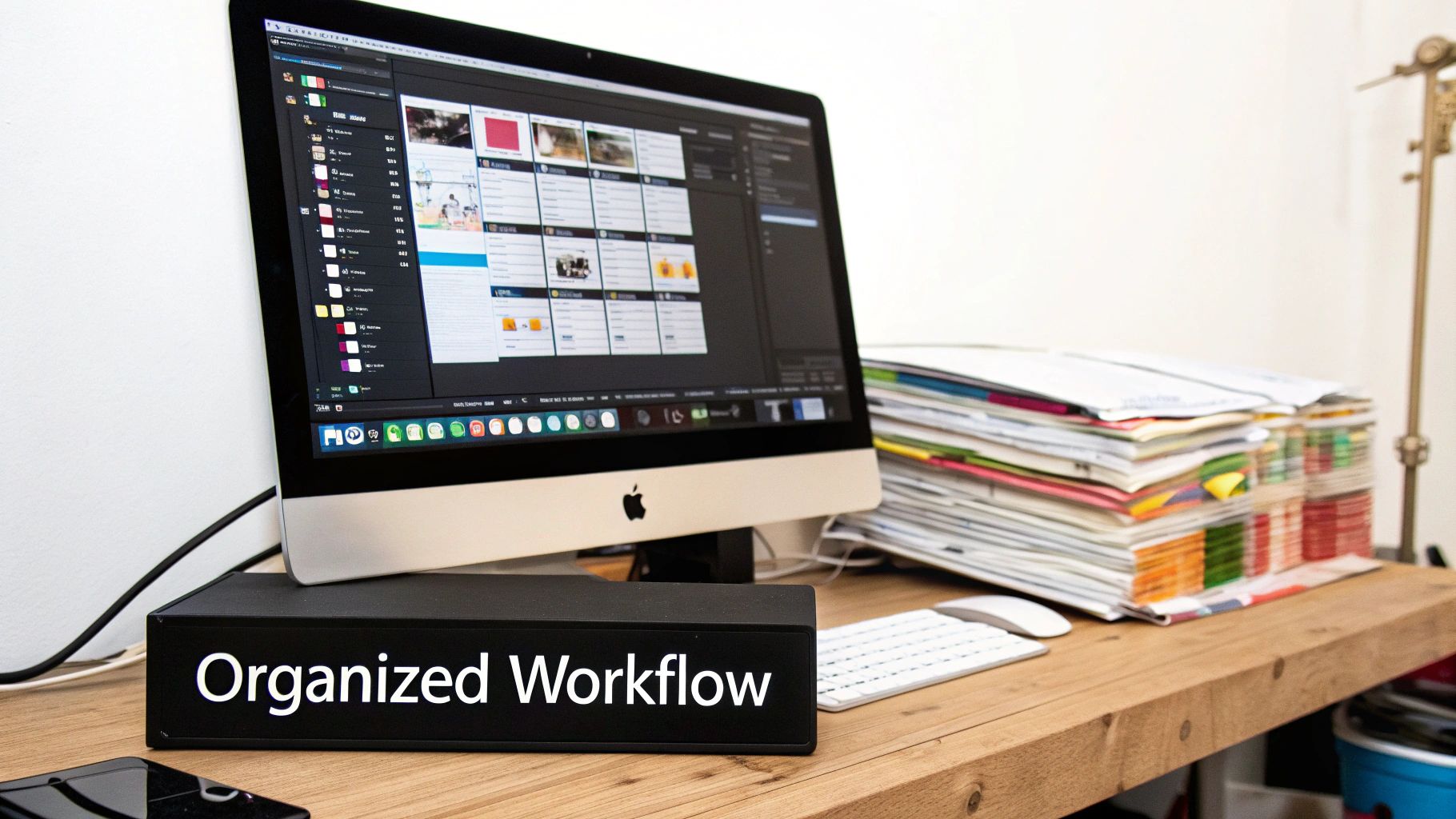
So, what separates a powerful digitales asset management (DAM) platform from a simple cloud storage folder? Think of it like this: a shared drive is a messy workshop with tools scattered everywhere. A DAM is a professionally organised workshop where every tool is labelled, in its place, and ready for the job.
At its core, a DAM gives your team a central, secure library for every piece of media. It’s the single source of truth that puts an end to the endless scavenger hunts across local hard drives, forgotten Dropbox folders, and old email threads. Instead of wasting time asking, "Has anyone seen that file?", your team can get back to creating.
This central hub is just the starting point. The real magic lies in the capabilities that turn a storage system into a productivity engine.
Centralised Storage and Intelligent Organisation
A DAM is much more than just a big hard drive in the cloud; it’s a smart one. It brings all your assets—from raw 4K footage and final edits to graphics, audio files, and project briefs—into one place. The crucial difference is how it organises them using intelligent metadata.
Forget about confusing folder trees. A proper video asset management system relies on tags, detailed descriptions, and custom fields to make everything searchable. This means you can find a specific shot based on the project it was for, the client, the people in it, or even the camera settings used.
WIKIO AI takes this a huge step further. With AI-powered features like automated tagging and semantic search, your team can look for assets based on concepts, not just keywords. Imagine searching for "happy customer interview outdoors" and getting instant results. Every clip becomes immediately useful.
Seamless Version Control
Anyone who has worked on a creative project knows the pain of version management. Emails flying back and forth with attachments named Final_Cut_v3_really_final.mp4 are a classic recipe for disaster. It’s how the wrong version ends up going live, wasting hours of work.
A DAM solves this with built-in version control. It keeps a clear history of every asset, ensuring everyone is always looking at and working from the latest approved file. For teams juggling feedback from multiple stakeholders, this feature isn’t a luxury; it’s a necessity for maintaining quality.
Granular Access Permissions and Security
Your video assets are valuable. A modern DAM protects them with incredibly specific access controls, letting you decide precisely who can view, download, edit, or share certain files and folders.
This level of control is non-negotiable for agencies, broadcasters, and post-production houses collaborating with a mix of internal staff and external partners. You can give access to clients and freelancers with complete confidence, knowing they’ll only see what you want them to see.
- Internal Teams: Grant your core creative team full access to upload, edit, and manage assets.
- External Collaborators: Give freelancers or partner agencies access only to the specific project folders they're working on.
- Client Review: Share secure, view-only links so clients can give feedback without being able to download the source files.
Wikio AI, as a modern alternative to older DAMs, stands out by offering free external collaboration. This is a huge deal, as it lets you bring clients and partners into the workflow without paying for extra user licenses. For agencies wanting to offer free video review for clients, this isn’t just a feature—it’s a competitive advantage.
Why Old-School Asset Management Just Can't Keep Up with Video
Let's be honest: many so-called digitales asset management systems were designed for a world that's long gone. They were built when a company's biggest assets were photos, PDFs, and maybe some design files. Think of them as digital filing cabinets—great for organising static documents, but completely out of their depth in today's video-first reality.
For any professional media team moving at speed, these legacy platforms create more headaches than they solve.
The heart of the problem is that video isn't just another file. It's a living, breathing, complex asset with layers of data. Older DAMs simply weren't built to handle the sheer size, intricate details, or the back-and-forth teamwork that defines modern video production. For broadcasters, post-production houses, and creative agencies, this mismatch quickly turns into a massive workflow bottleneck.
Where Traditional Systems Cause the Most Friction
When you try to force a video workflow into a traditional DAM, you feel the pain almost immediately. Sluggish transcoding can have your team sitting around for hours just to watch a preview. The video players are often clunky and low-resolution, making precise, frame-accurate reviews a nightmare. On top of that, most were never intended to be a creative collaboration software solution.
This gap forces teams into clumsy workarounds. You end up emailing massive files, juggling feedback in messy spreadsheet trackers, and losing track of which version is the final one. It's organised chaos, at best.
Here’s where they really fall short:
- Terrible Video Previews: Many older systems can't generate smooth, high-quality proxies, so trying to give frame-accurate feedback is nearly impossible.
- Zero Built-in Collaboration: They're missing the features of a proper video review tool, pushing all that critical feedback and conversation outside the platform where it gets lost.
- Clueless About Video Metadata: They can't understand or use the rich, time-based metadata that makes video truly valuable—things like transcripts, speaker tags, or scene descriptions.
- Painfully Slow Performance: They're often built on outdated tech that chokes on large 4K or 8K video files, making ingestion and processing a slow, frustrating process.
WIKIO AI was born from these frustrations. It was engineered from the ground up as a modern alternative to legacy DAMs, specifically to solve the challenges video teams face every day. It’s not just a storage bucket; it’s a powerful video collaboration platform that bakes high-performance tools right into your workflow.
How WIKIO AI Steps in as the Modern Solution
Where older systems hit a wall, WIKIO AI breaks right through. It's a powerful Frame.io alternative built for the speed, scale, and intelligence that modern media teams demand.
The platform provides a buttery-smooth, high-performance player for review and approval. But the real game-changer is how its AI brings your archive to life. Features like AI subtitle translation into over 40 languages or automatic profanity detection for compliance checks aren't just novelties; they're huge time-savers.
This shift towards intelligent automation is happening fast. In France, the media and entertainment sector is rapidly moving to modern DAMs to get a handle on their massive video libraries, with adoption expected to reach 50% by 2025. For the country's 700+ broadcasters, AI-powered search is already cutting asset discovery times by an incredible 75%. You can learn more about these shifts by exploring France's DAM market growth and trends.
Crucially, WIKIO AI tears down the biggest barrier to teamwork: cost. While most competitors charge you for every single user, WIKIO AI offers free external collaboration. This means an agency can easily offer "free video review for clients," making the approval cycle faster and smoother without adding to the bill. As a complete video feedback tool, it keeps all communication in one place, helps you deliver projects faster, and ultimately frees your team up to do what they do best: create amazing work.
Unlocking Creative Potential with AI-Powered Asset Management
Artificial Intelligence isn't some far-off concept anymore. It's a real, practical toolkit that can turn a static media library into an active, intelligent creative partner. For professional media teams, AI-powered digitales asset management isn't just about organising files a bit better—it's about unlocking the hidden value inside every single video you own.
Modern platforms have moved way beyond simple cloud storage. They use AI to tackle the most tedious, time-consuming tasks that bring creative workflows to a grinding halt, from transcription to translating content for global audiences. This shift is turning video archives from a cost centre into a source of immediate creative and commercial fuel.
From Manual Labour to Automated Insight
A great example of this evolution is WIKIO AI, a modern alternative to clunky, older DAMs that puts intelligent tools right inside your workflow. Instead of your team wasting hours scrubbing through footage or manually creating subtitle files, the platform automates it all. This frees up your creators to actually create.
WIKIO AI offers a whole suite of AI-powered tools built specifically for the needs of broadcasters, agencies, and post-production houses:
- Automatic Transcription: Every word spoken in your video library gets transcribed with impressive accuracy. Suddenly, your entire spoken-word archive becomes a searchable text database.
- AI Subtitle Translation: You can translate subtitles automatically into over 40 languages. A global brand can adapt a campaign for international markets in minutes, not weeks.
- Profanity Detection: The AI automatically flags any questionable language, which is a lifesaver for ensuring brand safety and broadcast compliance.
- Semantic Search: This is where things get really powerful. Forget searching for simple keywords in a file name. Now, you can search for concepts. A documentary team could search for "interview clips discussing climate change with a hopeful tone," and the AI will dig up relevant moments across terabytes of footage.
Putting AI into Practice
Think about a real-world scenario for video collaboration for agencies. A global marketing agency needs to launch a new product video across Europe. The traditional way is a nightmare: manually transcribe the video, send the script to different translation agencies, then painstakingly create and time subtitle files for each language. It’s slow, expensive, and leaves plenty of room for error.
With a platform like WIKIO AI, that entire workflow is turned on its head. The video is uploaded, automatically transcribed, and the team can then translate subtitles automatically with just a few clicks. What once took days of coordinated effort now happens in minutes, radically speeding up the campaign's time-to-market.
This level of automation is fast becoming essential. The digital asset management market in France is booming, driven largely by the media sector’s hunger for smarter tools. Features like AI-powered auto-tagging and instant search are cutting manual review time by up to 70% for post-production studios. And with the European Accessibility Act's 2025 deadline looming, AI is also critical for automating captions to ensure compliance. You can explore the full research on the DAM market's explosive growth for more details.
Unlike competitors, WIKIO AI builds AI into the very core of its video asset management system. This makes your entire archive a fully searchable, ready-to-use resource, positioning it as a formidable Frame.io alternative for teams that need to work faster and smarter.
The platform really acts as a comprehensive creative collaboration software, where AI doesn't just organise your assets but actively enriches them. This makes WIKIO AI much more than a simple video review tool; it’s an intelligent engine that surfaces insights and opportunities you never even knew you had. To see how these features stack up against other options, check out our guide on finding the best video asset management solution for your team.
How to Choose the Right Video Asset Management Platform
Picking the right platform for your video assets is one of the biggest technology decisions a creative team will ever make. This isn't just about buying a piece of software; it's about choosing the central hub that will shape your entire content workflow. Get it right, and your projects fly. Get it wrong, and you’re creating daily friction for everyone.
To make a smart choice, you need to look past the flashy marketing and focus on what actually matters. The best digitales asset management platforms feel like a natural extension of your team's creative process, helping you move faster and collaborate without headaches.
Your Evaluation Checklist
As you start looking at different options, measure them against these core benchmarks. A solid creative collaboration software should tick all these boxes, proving it can handle your current needs and grow with you down the road.
- Scalability: Can the platform keep up as your library balloons from a few terabytes to petabytes? Performance shouldn't dip just because you're successful.
- Integration Capabilities: How well does it play with your other tools? You need smooth connections with essentials like Adobe Premiere Pro, After Effects, and your project management software.
- Collaboration Features: Is the video feedback tool intuitive? Look for time-stamped comments, clear version control, and easy-to-use annotation tools that don't require a manual to understand.
- Security Protocols: Your video assets are valuable intellectual property. The platform must offer serious security, from granular user permissions and encryption to compliance with standards like GDPR.
- Transparent Pricing: Are the costs clear and predictable? Be wary of solutions that surprise you with hidden fees for storage, bandwidth, or adding external collaborators.
The move to cloud-based tools is more than a trend; it's a necessity. Cloud deployments are on track to make up 63.40% of European revenues by 2025, largely because they support the remote and hybrid teams that are now the norm. In France, where over 60% of media professionals work in a hybrid model, this shift is particularly strong.
This is where modern tools shine. For example, enterprises are cutting localisation costs by up to 50% with automated subtitling features found in platforms like WIKIO AI.
WIKIO AI vs Frame.io
When evaluating your options, a common comparison is between a comprehensive video collaboration platform like WIKIO AI and a dedicated video review tool like Frame.io. While both excel at gathering feedback, their core purpose is different.
Frame.io is excellent for the review and approval stage of a project. However, WIKIO AI is designed as a complete video asset management solution that covers the entire lifecycle of your media. It combines review tools with powerful AI-driven organisation, search, and global distribution features.
WIKIO AI vs Vimeo Review
Vimeo is a well-known video hosting platform that also offers review tools. It's a solid choice for creators who primarily need to host and share final videos. The main difference is that WIKIO AI is built as a B2B creative collaboration software for professional media teams managing complex workflows. WIKIO AI provides advanced features like AI subtitle translation into 40+ languages, semantic search, and free external collaborator seats, which are critical for agencies and broadcasters but generally beyond the scope of a platform like Vimeo.
Modern DAM Feature Comparison: WIKIO AI vs Legacy Tools
| Feature | WIKIO AI | Legacy DAMs | Frame.io |
|---|---|---|---|
| External Collaboration | Free & unlimited | Limited or costly | Paid per user |
| AI Subtitle Translation | Yes (40+ languages) | No | No |
| Semantic Search | Yes | Basic keyword search | No |
| Profanity Detection | Yes | No | No |
| Primary Focus | Video Asset Management | General File Storage | Video Review Tool |
This table clearly highlights what makes a tool like WIKIO AI a powerful Frame.io alternative. While Frame.io is an excellent video review tool, its focus is narrow. A true video DAM expands on that with a complete suite of AI-powered management features that handle the entire asset lifecycle.
The big difference-maker here is that WIKIO AI offers free external collaboration. For agencies and post-production houses, this is huge. It means you can provide free video review for clients without watching your subscription costs spiral out of control.
This is where AI really changes the game, transforming how teams work with their video libraries.
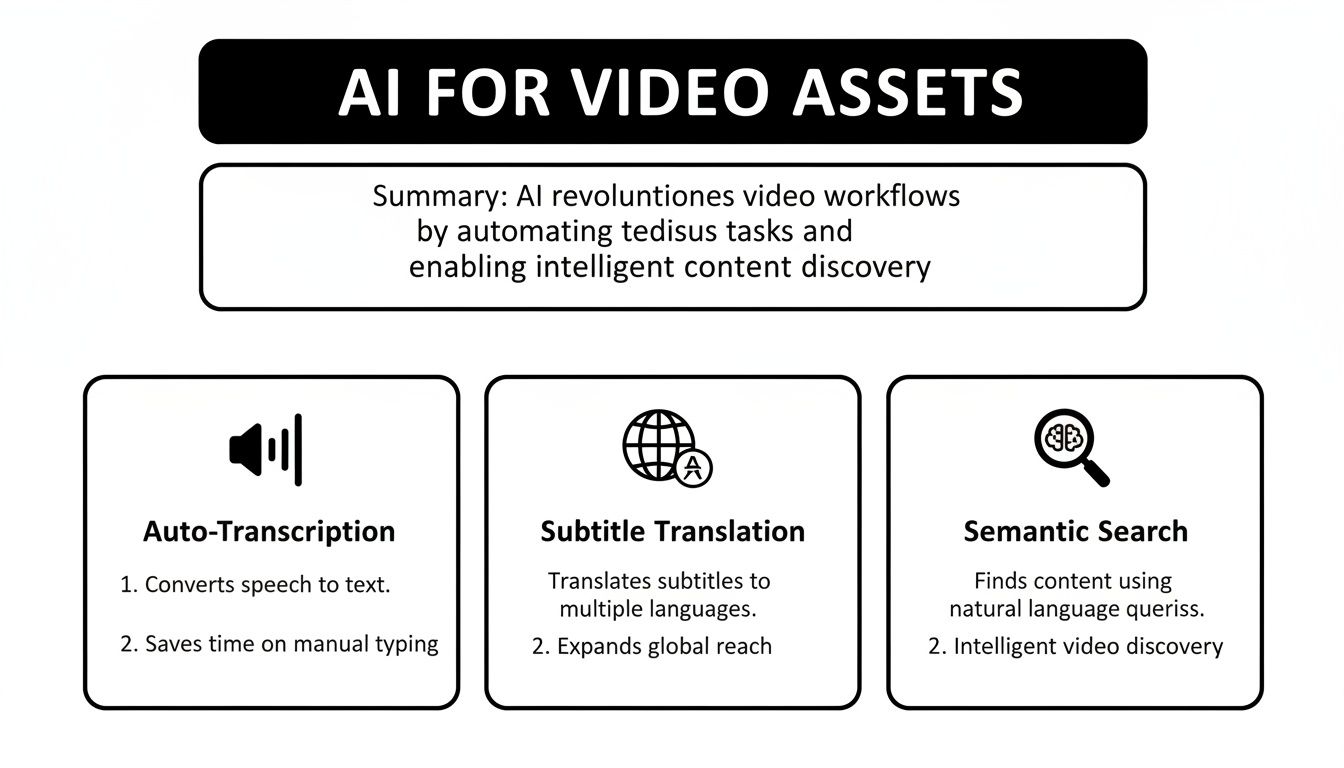
These tools turn a passive video archive into an active, intelligent resource. You can translate subtitles automatically into dozens of languages or find a specific moment in a two-hour interview just by searching for a phrase someone said.
For a much deeper dive into the selection process, you can learn more about choosing a DAM in our complete guide. In the end, choosing the right platform is about giving your team the power to create better content, faster than ever before.
FAQ: Your Top Questions About Digitales Asset Management
If you’re a professional media team, broadcaster, or creative agency looking into a digitales asset management solution, you probably have a few questions. Getting clear answers is the key to choosing a platform that actually helps your creative process, rather than hindering it.
What’s the real difference between cloud storage and a DAM?
Think of it this way: cloud storage like Dropbox is a digital filing cabinet. It’s great for just holding files. A Digital Asset Management (DAM) system, on the other hand, is more like a smart library with a built-in research assistant who knows your collection inside and out. A DAM gives you powerful tools for metadata tagging, version control, deep searching, and controlled distribution. But modern platforms like WIKIO AI go even further. With AI that automatically transcribes your videos and understands natural language, your passive archive is transformed into an active, searchable resource you can actually use every day.
How can a video collaboration platform really help my agency?
A proper video collaboration platform like WIKIO AI brings your entire video review process under one roof. Say goodbye to endless, confusing email chains with vague feedback. Instead, you share a single, secure link where clients and team members can drop time-stamped comments directly on the video timeline. What’s crucial here is that WIKIO AI offers free external collaboration. This means agencies can provide "free video review for clients" without paying for extra user seats. When you pair that with AI features like automatic subtitle translation, you start to see how much manual work gets eliminated. It’s a serious Frame.io alternative designed to get projects approved and delivered faster.
Is WIKIO AI secure enough for our sensitive media?
Absolutely. WIKIO AI is built on an enterprise-grade security framework from the ground up. We understand that your media assets are your intellectual property, so we provide robust security features, including granular user permissions that let you control exactly who can view, edit, or download specific files. All your data is encrypted both in transit and at rest, and our infrastructure is managed by security experts to meet strict compliance standards. This gives you peace of mind and lets your team focus on creating, not on server maintenance.
How does the “semantic search” in WIKIO AI actually work?
A standard keyword search is pretty basic—it just looks for an exact word in a filename or a tag. WIKIO AI's semantic search is completely different. It uses AI to understand the context and meaning behind what you're asking for, a feature that really defines a modern video asset management platform. For example, you could search for "customer testimonial in an urban setting at sunset." The AI doesn't just look for those words. It analyses the visual content, spoken words in the transcript, and existing metadata to find clips that fit that entire description, even if the filename is just Project_Final_v3.mp4. This is about finding specific moments inside your entire video library, instantly. It saves an incredible amount of time that would otherwise be spent scrubbing through footage manually.
Ready to see what a modern alternative to legacy DAMs can do for your team? Discover how WIKIO AI, a complete video collaboration platform, can upgrade your digitales asset management and speed up your entire creative process. Book your demo today!