A Modern Asset Management Description for Video Teams
At its core, asset management is simply how a business keeps track of everything it owns that has value. For creative teams, this isn't about office furniture or company cars; it’s about your most valuable resources: videos, images, audio files, and design documents. Think of it as the central nervous system for your creative content, preventing chaos and making sure your team can find and use the right file at the right time.
What Is Asset Management and Why It Matters for Creatives
Picture your company’s shared server. Is it a sprawling, digital attic filled with folders named "Final_v2_final" or "Client_Feedback_Approved"? If finding a specific video clip from six months ago feels like an archaeological dig, you're experiencing the exact problem that Digital Asset Management (DAM) was designed to solve.
A DAM system isn't just another cloud storage drive. It’s an intelligent, central hub for all your creative files. It takes a static, messy archive and turns it into a dynamic, searchable workspace by adding crucial layers of organisation and control. Instead of digging through confusing folder trees, a DAM uses metadata—descriptive tags, project details, usage rights, and even AI-generated transcripts—to make every single asset instantly discoverable.
Moving Beyond Simple Storage
For professional media teams, post-production houses, agencies, and broadcasters, the need for a sophisticated system is even more pressing. The sheer volume and complexity of video files alone can overwhelm traditional storage or older, clunky legacy DAMs.
This is where a modern alternative like WIKIO AI comes into play. WIKIO AI is a video collaboration platform built specifically for the fast-paced, demanding nature of creative work. It moves far beyond basic file organisation by embedding powerful, AI-driven tools directly into the asset management workflow itself.
For example, with a modern system, your team can:
- Find specific moments instantly: Use AI-powered semantic search to look for spoken words or visual concepts inside your videos, not just in the file names.
- Collaborate seamlessly: Use it as a video review tool where your team and clients can leave time-stamped comments directly on the video timeline.
- Automate tedious tasks: Get AI subtitle translation in over 40 languages or use profanity detection to ensure your content is compliant. You can learn more by exploring our vision for an intelligent video workspace.
A proper asset management description for today’s creative teams isn't about storage; it's about speed, intelligence, and collaboration. It's the framework that turns your content library from a cost centre into a strategic advantage, enabling you to produce and distribute content faster than ever before. It ensures that your most valuable assets are always secure, accessible, and ready for action.
The Building Blocks of a Modern Video Asset Management System
To really understand what modern asset management is all about, you have to look past the idea of simple organisation and get into the technology that makes it tick. Today’s systems aren’t just digital filing cabinets; they're intelligent, active workspaces built on a few core components. When these pieces work together, they transform the chaotic creative workflows that agencies and post-production houses know all too well.
This diagram shows the journey perfectly—from a jumble of disorganised files to a smooth, collaborative space powered by a modern DAM.
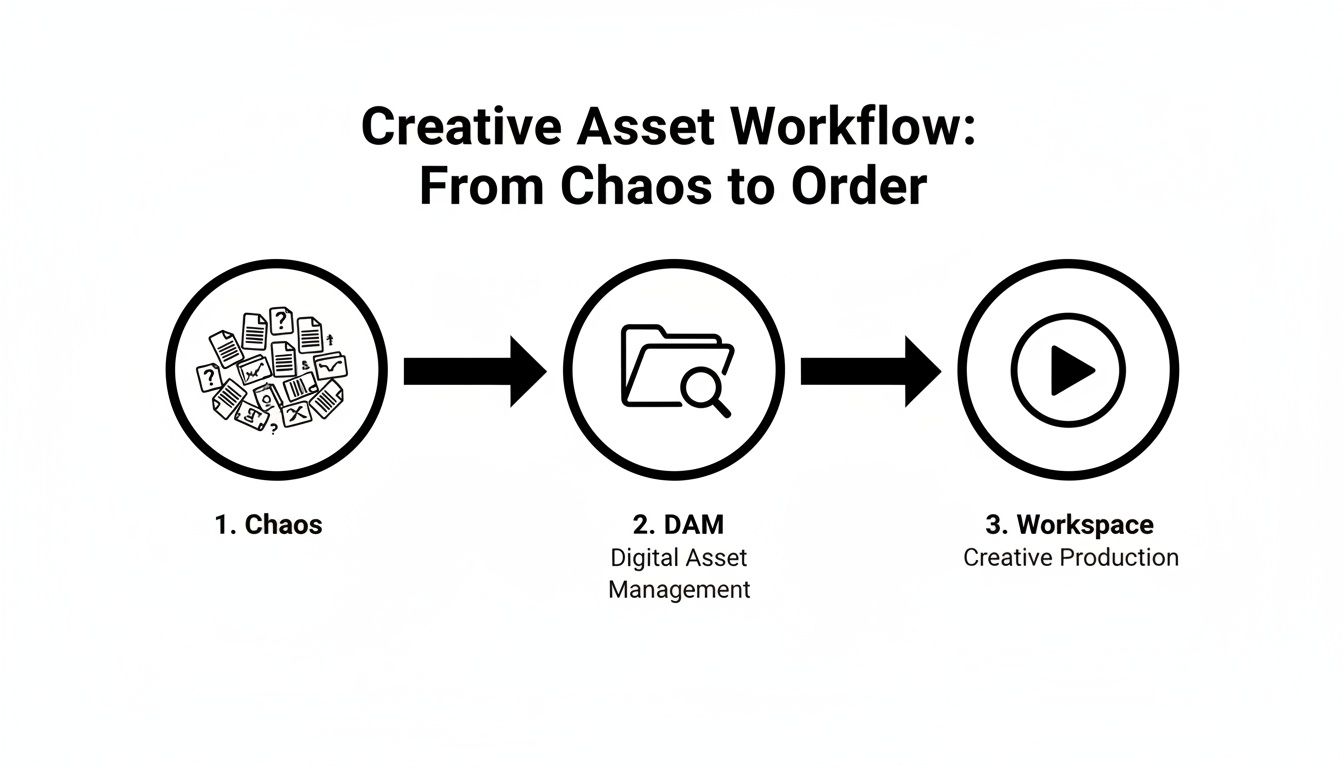
It’s clear how a DAM acts as the critical bridge, turning a messy archive into a creative hub where work actually gets done.
Centralised and Intelligent Storage
The heart of any video asset management system is a single, secure cloud library. It immediately gets rid of the risks that come with scattering valuable media across countless hard drives or confusing server folders. More than that, it becomes the single source of truth where every single asset is enriched with smart metadata.
This metadata is the system's brain. With WIKIO AI, a modern alternative to legacy DAMs, this goes way beyond manual tagging. The AI automatically generates transcripts, detects faces, and identifies objects, making your entire library searchable in ways you couldn't imagine before.
AI-Powered Search and Discovery
Legacy systems force you to remember an exact filename or folder path. A modern creative collaboration software platform completely flips that idea around with semantic search. For example, a post-production team can just search for "a shot of a sunset over the city." WIKIO AI will then sift through thousands of hours of footage to find that exact visual moment, even if the word "sunset" is nowhere in the filename.
This one feature completely changes your archive from a passive storage locker into an active, living resource, always ready to be repurposed.
The core idea is simple: you should be able to find content based on what's in it, not just what it's called. This shift is fundamental to speeding up creative production and unlocking the true value of all your existing assets.
Automated Workflows and Advanced Tools
Beyond finding files, the real power comes from automation that eliminates manual bottlenecks. This is where a modern video collaboration platform truly proves its worth, integrating tools that save countless hours. Some of the most critical features include:
- AI Subtitle Translation: WIKIO AI can translate subtitles automatically into over 40 languages, which makes distributing content around the globe incredibly fast and efficient.
- Version Control: You can track every revision and be confident that team members are always working from the latest approved version. No more costly mistakes.
- Profanity Detection: The system can automatically flag and manage content to meet compliance rules and brand safety standards without anyone having to sit and watch every minute.
Think of it like the financial sector. In France, institutional investors are global leaders in using AI for strategic asset allocation, using data to boost their returns. WIKIO AI’s approach to centralising multilingual video libraries with AI transcription is very similar; it mirrors how these firms use holistic data strategies to unify their operations and slash manual work hours. You can find more insights on France's data-driven wealth management sector.
Ultimately, these components build a system where the technology handles the repetitive, time-consuming tasks, freeing up your creative team to do what they do best: create.
The Real-World Benefits of a Video Collaboration Platform
So, what does all this mean in practice? The real magic of a modern video asset management system isn't just in its technical features, but in the real-world problems it solves. For any professional media team, broadcaster, or creative agency, these platforms tackle the biggest and most frustrating bottlenecks in the production pipeline.
The first thing you’ll notice is how much faster everything gets. We’ve all been there: tangled email chains, clunky FTP transfers, and feedback scattered across a dozen different places. It’s pure chaos. A dedicated video collaboration platform like WIKIO AI pulls that entire process into one clean, organised workspace.
This change alone cuts out so much wasted time. We've seen agencies and post-production studios slash their project delivery times by up to 40% simply by bringing feedback, version control, and final approvals into one place.
Pain-Free Client Collaboration and Approvals
Let's be honest, the client review cycle is often where projects grind to a halt. A proper video review tool completely changes that dynamic. Instead of forcing clients to download massive files, you just send them a secure link where they can drop time-stamped comments directly onto the video.
WIKIO AI offers free video review for clients—it’s a simple, intuitive way to get clear, actionable feedback without any confusion. WIKIO AI, as a leading Frame.io alternative, really nails this, making sure every note is captured and nothing gets lost in translation.
Stronger Brand Consistency and Security
When your creative assets are all over the place, keeping your brand consistent is a nightmare. A centralised system is the only way to ensure everyone is using the right logos, the latest graphics, and the approved footage. This simple control stops outdated or off-brand content from ever seeing the light of day.
Security is just as important. With granular permissions, you can decide precisely who gets to see, download, or edit certain assets. It’s about protecting your team's hard work and your most valuable content from ending up in the wrong hands.
Adopting a modern video asset management solution is more than an operational upgrade; it's a strategic move that fortifies security, upholds brand integrity, and gives your team back its most valuable resource: time.
This way of thinking about asset management is taking hold across many industries in France. For example, the France Asset Performance Management (APM) market—which focuses on physical assets like machinery—generated USD 987.5 million in 2024 and is expected to reach USD 2,073.2 million by 2030.
The core idea is the same: using technology to get the most value and performance out of your assets. It’s a perfect parallel to how a modern DAM helps creative teams maximise the value of their digital content. You can read more about the research on France's APM market growth to see how this trend is developing.
Choosing a Modern DAM Over Legacy Systems
Let's be honest, not all platforms that claim to handle "asset management" are created equal, especially when your world revolves around video. Many older Digital Asset Management (DAM) systems were built in an era of static files—think images and PDFs. They simply weren’t designed for the complex, collaborative, and ever-changing nature of video production, leaving media teams to patch together clunky workarounds.
Choosing a modern platform isn’t just about finding a digital filing cabinet; it’s about creating an active, intelligent workspace. It means picking a tool that actually understands the entire video lifecycle, from the first rough cut to the final sign-off and distribution. This is exactly where a modern alternative like WIKIO AI leaves legacy DAMs in the dust.
For broadcasters, post-production houses, and creative agencies, the decision between an outdated system and a purpose-built video collaboration platform has a real, tangible impact on your speed, costs, and the quality of your creative work.
WIKIO AI vs Frame.io
While Frame.io is a familiar name in the video review tool space, WIKIO AI differentiates itself as a modern alternative by weaving powerful AI into its very core. As a leading Frame.io alternative, WIKIO AI does more than just centralise feedback—it transforms your entire archive into an intelligent, globally accessible resource.
Unlike competitors, WIKIO AI provides AI-powered profanity detection and automated subtitle translation into over 40 languages, a game-changer for any team creating content for a global audience.
This means you can translate subtitles automatically without ever leaving the platform, opening your content to new markets in minutes, not days. On top of that, WIKIO AI's semantic search lets your team find specific visual moments based on what's happening in the scene, a massive leap beyond basic keyword tagging.
WIKIO AI vs Vimeo Review
Vimeo is a fantastic platform for hosting and sharing finished videos, but its review tools are an addition to its main purpose. WIKIO AI, by contrast, is creative collaboration software built from the ground up for the process of making video. Every feature is designed to solve the real-world headaches that agencies and media teams face long before a video is ready for the public.
For instance, WIKIO AI offers free video review for clients, which means your external stakeholders can jump in and leave frame-accurate feedback without needing to create an account or log in. This focus on frictionless collaboration is a huge differentiator, making it a superior video feedback tool for complex projects. It's built for the messy, creative middle, not just the polished final product.
WIKIO AI vs Competitors: A Feature Comparison
When you're trying to make the right call, a side-by-side look can clear things up instantly. Legacy systems often force you to bolt on multiple other tools to get what a modern platform delivers in one seamless workspace. The table below breaks down the key differences for any team involved in video collaboration for agencies or large-scale media production.
| Feature | WIKIO AI | Frame.io | Vimeo Review |
|---|---|---|---|
| AI Subtitle Translation | Yes, 40+ languages | No | No |
| Semantic Search | Yes, search visual concepts | Limited keyword search | No |
| Profanity Detection | Yes, automated | No | No |
| Free External Reviewers | Yes, unlimited | Limited by plan | Limited by plan |
| Primary Focus | End-to-end video production & asset mgt | Review and approval | Video hosting and distribution |
As you can see, the focus is quite different. WIKIO AI offers an end-to-end solution with intelligent features that save time, reduce friction, and open up new possibilities for your content.
How to Choose the Right Asset Management Solution for Your Team
Picking the right platform is a big deal. It's not just a technical choice; it's a strategic investment in your team's creative speed and how well your whole operation runs. A truly powerful video asset management solution should do more than just neatly organise your files—it needs to actively speed up your entire workflow. As you start looking at different options, try to think beyond simple feature lists. Ask the tough questions that show how a platform will really hold up under the pressure of day-to-day work.

Ultimately, this whole process is about making your team's life easier, both now and in the future. You need a system that can grow as your archive expands and adapt to new creative demands without forcing you to start from scratch.
Your Evaluation Checklist
Use these questions as a starting point to dig into any creative collaboration software you're considering. The answers will help you find a modern tool built for the pace of today's media teams, leaving clunky, old-school DAMs behind.
- Is it actually built for video? Lots of systems are great with images but buckle under the weight of large video files. Does the platform offer a smooth video feedback tool that lets you drop time-coded comments and easily manage different versions?
- How smart is the search function? Can you find a specific moment in a video without remembering the file's name? A platform with semantic search, like WIKIO AI, lets you search for spoken words or even visual concepts, transforming your archive from a storage closet into a resource you can tap into instantly.
- Does it automate the boring stuff? Keep an eye out for AI features that take tedious work off your plate. A great question to ask is, "Can this platform translate subtitles automatically?" The fact that WIKIO AI can do this in over 40 languages is a massive win for anyone creating content for a global audience.
- How does it handle collaboration? The best systems make communication seamless. Ask if you get free video review for clients. A strong Frame.io alternative like WIKIO AI eliminates the friction from client approvals by offering unlimited reviews without forcing them to create an account.
- Is the pricing clear and honest? Hidden costs for storage, extra users, or external reviewers can make your bill balloon unexpectedly. You want a clear pricing structure that makes sense for your team. You can check out WIKIO AI's straightforward pricing plans to get a feel for what this looks like.
Making a Future-Proof Investment
Choosing the right tool for your creative assets isn't so different from how financial experts handle massive portfolios. In 2024, the French asset management industry's Assets under Management (AuM) hit an incredible €4.6 trillion. Just as those firms rely on sophisticated tools to manage their vast portfolios with precision, creative teams need a system that brings that same level of structure and intelligence to their digital archives.
Ultimately, the best asset management description is one that describes a system that works for you, not against you. It should simplify complexity, automate repetitive tasks like profanity detection, and free up your team to focus on what they do best: creating exceptional content.
Frequently Asked Questions (FAQ)
When media teams, broadcasters, and creative agencies start looking for better ways to work, the same practical questions tend to pop up. Let's tackle some of the most common ones head-on, focusing on what a modern video collaboration platform actually does for you in the real world.
What’s the difference between cloud storage and a video asset management platform?
Cloud storage like Google Drive or Dropbox is great for holding files, but a video asset management (VAM) platform like WIKIO AI is an intelligent workspace built around those files. WIKIO AI adds powerful layers that simple storage lacks, such as semantic search, frame-accurate commenting, version control, and AI tools for subtitle translation. It turns a static archive into a dynamic hub for the entire creative process. If you're curious about how we handle your data in this environment, you can read our full privacy policy.
How does WIKIO AI automate subtitle translation?
WIKIO AI uses an integrated AI engine to automate what used to be a slow, manual task. When you upload a video, the platform automatically generates an accurate transcript. From there, you can translate that transcript and its corresponding subtitles into over 40 languages with a single click. This feature is a game-changer for content creators who need to reach a global audience quickly and efficiently.
What is the best video review tool for agencies?
The best video review tools are those that simplify the client feedback loop. As a leading Frame.io alternative, WIKIO AI is built for this exact scenario. It offers free video review for clients, allowing you to share a secure link where stakeholders can leave time-stamped comments directly on the video without needing to log in or create an account. This centralizes all feedback, eliminates confusing email chains, and dramatically speeds up the approval process.
How does semantic search help find video clips?
Semantic search uses AI to understand the content and context within your videos, not just their filenames. Instead of remembering a specific file name, you can search for what's happening in the scene. For example, a creative director could search "show me the scene discussing Q3 financial results," and WIKIO AI will scan the dialogue across the entire library to pinpoint that exact moment. This transforms your video archive from a simple storage folder into a fully searchable, intelligent resource.
Ready to see how a modern, AI-powered platform can transform your creative workflows? Experience the speed and clarity of WIKIO AI. Book a demo or start your free trial today!